












Image Loading
Attesa a matrice di punti e rivelazione animata per immagini AI
Sostituisci il monotono spinner di generazione con 9 matrici di punti procedurali che respirano, abbinate a 9 transizioni di rivelazione con rifrazione ai bordi e dispersione cromatica, combinabili liberamente e regolabili dal vivo.
Generare un’immagine con l’AI richiede spesso diversi secondi di attesa, se non di più. Lasciare una semplice icona rotante al centro di una cornice vuota rende l’attesa lunga e monotona; mostrare poi di colpo l’immagine finita crea uno stacco altrettanto brusco. Progettare attesa e comparsa come un’unica esperienza continua cambia tutto — durante la generazione la cornice si riempie di una matrice di punti che respira guidata da una funzione, sormontata da una riga di stato attraversata da un riflesso luminoso; appena pronta, l’immagine affiora e si assesta direttamente attraverso i punti, legando i due momenti con naturalezza.
L’attesa: far respirare la matrice di punti
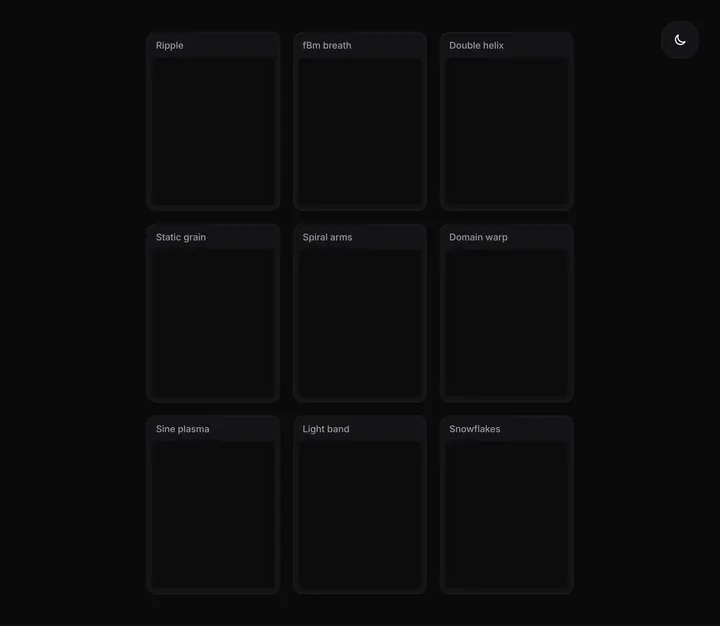
Prima che l’immagine sia pronta, la cornice ospita una griglia quadrata con passo predefinito di 20px, in cui raggio e opacità di ogni punto sono calcolati in tempo reale dal suo centro tramite una funzione, con una morbida vignettatura lungo il perimetro; in tema scuro i punti accesi diffondono un leggero alone e il bordo della cornice respira con due strati luminosi, interno ed esterno, che ruotano in senso opposto. I 9 pattern di attesa si dividono in tre famiglie:
- Basati su rumore: fBm breath sovrappone quattro ottave di rumore frattale in lenti chiaroscuri simili a nubi e fa anche da base agli altri effetti; Domain warp spinge uno strato di rumore con un altro accompagnandolo con una deriva unidirezionale, restituendo il flusso del fumo.
- Geometrici: Ripple espande onde concentriche dal centro, Spiral arms fa ruotare tre bracci a spirale, Sine plasma combina l’interferenza di quattro onde sinusoidali, Light band fa scorrere in diagonale una fascia di luce morbida ogni 3,3 secondi, Double helix attraversa la cornice con una doppia elica in rotazione completa di legami trasversali, e Snowflakes lascia cadere in lenta rotazione fiocchi esagonali ramificati insieme a un nevischio di singoli punti (ogni braccio copre almeno 4 passi di griglia, così le ramificazioni restano leggibili anche in cornici piccole). Tutti i pattern geometrici incorporano un velo di rumore leggero che mantiene minime variazioni di luminosità tra i punti, rendendo più viva la sensazione di «generazione in corso».
- Casuali: Static grain interpola morbidamente ciascun punto tra livelli casuali di luminosità secondo la propria fase (circa 2,5 volte al secondo), richiamando l’effetto neve dei vecchi televisori senza sfarfallii secchi.
La comparsa: 9 transizioni
Ogni matrice di attesa ha una transizione di comparsa abbinata per impostazione predefinita, ma qualsiasi pattern può combinarsi liberamente con qualsiasi transizione; tra tutte, Halftone, Dissolve, Denoise e Cells sono le più versatili:
| Transizione | Pattern predefinito | Modalità di rivelazione |
|---|---|---|
| Fisheye (occhio di pesce) | Ripple | Un cerchio si espande dal centro con l’immagine incurvata a fisheye all’interno, spianandosi gradualmente mentre si allarga |
| Halftone (retino in espansione) | fBm breath | I punti assumono prima il colore medio della rispettiva zona espandendosi fino a toccarsi, poi nella seconda metà mettono a fuoco dal morbido al nitido |
| Unzip (apertura a zip) | Double helix | Si apre a onde dalla linea mediana orizzontale verso l’alto e il basso, con bordi che seguono l’elica fino a raddrizzarsi |
| Denoise (riduzione rumore) | Static grain | Un’immagine molto sfocata con grana dinamica aggiornata 24 volte al secondo si ripulisce progressivamente, come nel denoising a diffusione inversa |
| Spiral (apertura a spirale) | Spiral arms | Un singolo braccio a spirale ruota dal centro della cornice svelando l’immagine al suo passaggio |
| Dissolve (dissolvenza) | Domain warp | Emerge dolcemente a zone seguendo una mappa di rumore morbida, con margini di transizione naturali |
| Interference (interferenza) | Sine plasma | Usa come soglia di rivelazione un campo d’interferenza in movimento continuo composto da quattro onde sinusoidali |
| Stream (scansione progressiva) | Light band | Avanza dall’alto verso il basso riga dopo riga, lasciando sopra il fronte una fascia progressiva a blocchi da 2px a 16px |
| Cells (schiusa cellulare) | Snowflakes | Suddivide l’area secondo un reticolo di Voronoi e nella prima metà sboccia morbida dai centri delle celle in istanti casuali |
Durante la comparsa, Halftone, Denoise e Cells propagano inoltre un’onda d’urto dal centro verso l’esterno: la fascia anulare stira lievemente l’immagine sul margine esterno e la comprime all’interno, velando con una misurata luce morbida a quattro colori solo la porzione già rivelata senza mai illuminare i punti ancora scoperti.
Dettagli condivisi da ogni transizione
- Ingrandimento e messa a fuoco morbida: la comparsa dura 1,4 secondi per impostazione predefinita con curva rapida in ingresso e lungo assestamento finale. L’immagine entra ingrandita del 10% e leggermente sfocata per poi posarsi sulle dimensioni reali diventando nitida (Halftone e Denoise gestiscono già da sé la messa a fuoco senza sommare altra sfocatura), mentre la cornice resta perfettamente ferma.
- Rifrazione del vetro ai bordi: i 26px interni lungo il perimetro agiscono come il bisello di una lastra di vetro, campionando l’immagine leggermente più all’interno (fino a 12px sul bordo estremo, per impostazione predefinita); anche i 20px subito dietro il fronte di rivelazione presentano una lieve rifrazione ondulata che si placa sul finale.
- Dispersione legata alla deformazione: solo nei punti spostati dalla rifrazione lo scostamento di campionamento dei canali rosso e blu aumenta o diminuisce del 30%; le aree ferme e piatte non separano mai i colori, e il fronte di avanzamento mantiene soltanto un sottile filo bianco senza disegnare contorni colorati artificiali.
- Decodifica e soglie temporali: avvia la transizione solo a decodifica completata (
image.decode()); seguendo il principio di 017 Pattern di caricamento, un’immagine pronta entro 300ms salta la matrice di punti con una semplice dissolvenza per evitare lampi fugaci; quando si generano più immagini affiancate (come in una griglia 3×3), scagliona gli ingressi con ritardi irregolari; se la richiesta fallisce, ferma i punti sul posto, spiega il motivo e offri un comando per riprovare.
Prestazioni e regolazione parametri
La luminosità di ciascun punto viene prima calcolata in una minuscola texture «un punto, un pixel» che il disegno a piena risoluzione si limita a leggere, evitando di ricalcolare il rumore su ogni pixel dello schermo; anche la maschera statica di dissolvenza viene generata una sola volta a metà risoluzione in avvio e poi riutilizzata. Il canvas copre solo il riquadro dell’immagine, limita la densità di pixel a 2× e mette in pausa il rendering appena esce dalla viewport; una volta assestata l’immagine, disegna l’ultimo fotogramma e ferma il ciclo con zero carico GPU a riposo. Con «Riduci movimento» attivo nel sistema, si consiglia di disattivare respiro, ingrandimento, rifrazione, dispersione e onda d’urto a favore di una griglia statica e di una dissolvenza di 200ms.
Velocità del respiro, durata della comparsa, passo dei punti, dimensione dei punti, scala del rumore, ingrandimento, sfocatura, dispersione, rifrazione ai bordi e alone in tema scuro sono tutti esposti come cursori; ogni pattern memorizza i propri valori predefiniti, ripristinabili con un doppio clic sulla singola riga o premendo Ripristina.
Passalo all’AI
Il Prompt qui sotto esamina prima il flusso di generazione immagini e lo stack di rendering già presenti nel progetto, confermando con te punto per punto dove applicare l’effetto, quale coppia pattern-transizione usare e chi può vedere il pannello di regolazione; dopo la tua conferma realizza l’implementazione su misura per la piattaforma con un fallback senza GPU, lasciando invariati layout, colori e testi originali del prodotto.
Build the wait and the arrival for generated images in my product. While an image is being made, its box shows a grid of dots that breathe in one of nine loading patterns, under a status line with a moving sheen. When the image is ready it comes in through the dots in one of nine reveals, enlarged and soft at first and settling sharp, its edges bending like glass, with a colour split where the picture bends; three of the reveals also send a shockwave across it. Any pattern can be paired with any reveal. A settings panel shows the key numbers as sliders, set to the defaults below, so they can be tuned live.

Every value here comes from a working demo and is a default, not a requirement. Build it with these values first, then let me tune them with the panel (section 9).

Before building, look at my project (section 0) and ask me these, one at a time, with the recommended answer marked:
1. Where it goes: every place a generated image appears (recommended; list them), or the ones I name.
2. Which pattern and reveal: one pair everywhere (recommended: fBm breath with Halftone grow, or let me pick from section 3 and 5), a pair per place, or a different pair for each new image.
3. The settings panel: only in development (recommended), behind a toggle, or for everyone.
Then sum up my answers, say how you will build it on my platform (section 10), and wait for my go-ahead.

0. Start from what exists
- Find how images are generated and shown: where a request starts, where the result arrives (URL, blob, base64 or stream), whether progress or a partial image is reported, and the component that draws the image box.
- Find how the project draws (DOM, canvas, WebGL, a native view tree), its framework and versions, its slider components, its dark mode and its reduced-motion setting.
- Tell me in a few lines what you found before asking.

1. Timing
- The pass: the dots fade in over 500ms; the status line reads "Making the first draft…", then "Refining the details…" after 1.3s, and "Done" once the image is decoded and starts to come in. Use my product's own wording and language if it has some.
- The reveal starts when the image is decoded (await image.decode() or its equivalent), never on the network response alone. It runs 1400ms with cubic-bezier(0.16, 1, 0.3, 1): fast in, a long settle. Call its progress R, 0 to 1, eased.
- If the image is ready within 300ms of the request, skip the dots and just fade it in, or the loading state flashes. If the request fails, stop the dots where they are, say what happened and offer a retry.
- Several images at once (a batch or a grid): each comes in after its own delay, picked unevenly, for example 0, 560, 220, 820, 380, 1040, 120, 700, 300ms across a 3 x 3 grid, so they arrive at uneven moments rather than together or as a sweep.

2. The box and the dots
- The image box has the image's own proportions and rounded corners (14px in a 600 x 772 card, the card 28px, concentric). Above it sits the status line, 20px type, in a dim ink; a 96px window of full ink, soft at both ends, crosses the text every 1.7s. Move the window and a copy of the text inside it in opposite directions as transforms, so the text never repaints.
- Dots on a square grid, pitch 20px, centred in the box. Each dot's value v (0 to 1) comes from its loading pattern (section 3), worked out once per dot, not per pixel. The dot's radius goes from 0.55px to 15% of the pitch with v, its opacity from 0.1 to 1. A vignette dims the dots near the box's edge: 0.45 + 0.55 * smoothstep(8, 72, distance to the edge).
- Dot glow (dark theme only): a soft halo round each lit dot, a Gaussian of sigma 0.3 * pitch, strength v^2, summed over the dot's own cell and its eight neighbours so halos cross cells without a seam.
- Edge glow while loading (dark theme only), in two layers set apart so they never swell together. Outer: a wide haze (exp(-d / 12)) and a thin line on the rim (exp(-d / 2.5)), d the distance in from the box's edge, breathing every 2.4s, with two brighter arcs turning clockwise once in 8s. Inner: a soft band about 6px in (a Gaussian 3.5px wide) plus a faint wide haze, breathing every 3.7s from the opposite point of its swell, with three arcs turning anticlockwise once in 11s. Both fade out over the first third of the reveal.
- Light theme: dark dots on a pale box, no glows, a softer rim on the reveals.

3. The nine loading patterns
All take p, the dot's centre in px, and t, the breathing clock in seconds (scaled by the Breathing slider, so changing speed never jumps). n is value noise in fBm: four octaves, each at twice the frequency and half the amplitude, read at p / scale (scale 180px) and t * 0.32.
- Ripple: rings from the centre, w = 0.5 + 0.5 * sin(r * 5.2 * PI / 2 - 2.6t), r = |p - centre| / scale; v = smoothstep(0.15, 0.85, mix(n, w, 0.6) * (0.55 + 0.6n)).
- fBm breath: v = smoothstep(0.28, 0.74, n). The base the others build on.
- Double helix: two strands lying across the box and turning, y = ±72 * sin(x / 44 - 1.8t) (in units of the box's height / 306), each a Gaussian 10 wide, the nearer one brighter (by cos of the phase), with base pairs on every second column between them.
- Static grain: each dot eases from one random level to the next about 2.5 times a second, on its own offset, mixed 42% over n. Ease between levels (smoothstep), or it blinks.
- Spiral arms: three arms, s = 0.5 + 0.5 * sin(3θ + 5.5r - 2.2t); v = smoothstep(0.12, 0.85, mix(n, s, 0.55) * (0.6 + 0.5n)).
- Domain warp: the noise read at a point pushed far by more noise, the whole drifting one way so it streams like smoke: drift = (0.22t, -0.1t); w = (fbm(q * 1.1 + drift), fbm(q * 1.1 + drift + 5.2)); v = smoothstep(0.34, 0.7, fbm(q + 4(w - 0.5) + 1.6 drift)).
- Sine plasma: four sines summed, sin(2.6x + 0.9t) + sin(3.1y - 1.1t) + sin(2.2(x + y) + 0.7t) + sin(4.4r - 1.5t), x, y in noise cells; v = smoothstep(0.2, 0.8, mix(0.5 + 0.125 * sum, n, 0.35)).
- Light band: a Gaussian band, 0.15 wide, sweeping diagonally across every 3.3s over half-strength noise.
- Snowflakes: six-armed flakes, each arm with a branch at half its length, one to a square of side z = max(0.27 * box height, 11 * pitch), placed at random in it, with an arm 0.37 to 0.5 z long, turning slowly as they fall (18px/s) with a little sway; behind them single-dot snow, one grain to a square of 0.4z, falling twice as fast at 35 to 60% brightness; noise at 12% beneath. Fold the angle into one twelfth of a turn so one arm and its branch, drawn once, make all six. Keep a flake's arm at least four dots long, or it reads as a blob.

4. How every image comes in
These apply to all nine reveals.
- Zoom in: the picture is read about the box's centre at 1 + 0.10 * (1 - R), so it arrives 10% enlarged and settles to its own size. The box itself never scales.
- Blur in: read the picture 3 mip levels softer at the start, easing to sharp: bias = 3 * (1 - R)^0.8. Halftone and Denoise blur on their own; skip it there.
- Edge bend: the box's rounded edge acts like the bevel of a glass slab. In the last 26px, read the picture from further in by bend * 2 * (1 - R)^0.7 * (1 - d / 26)^2 px (bend 6), so it stretches toward the edge; the edge itself stays put. Along a reveal's own front, the 20px just inside it bend the same way, by bend * exp(-(d / 14)^2), with a slow noise wobble of ±67% along the front, fading out as R passes 0.85.
- Dispersion: wherever the picture is read from a moved place, read red from 30% further along the move and blue from 30% less. Colour then splits only where the picture bends, never where it holds still. Do not draw a coloured outline on the edge; the split belongs to the picture.
- A thin white line rides each front (strength 0.55 on dark, 0.22 on light), fading as R passes 0.85.

5. The nine reveals
Each opens the picture over the dots by a mask a; R is the eased progress.
- Fisheye lens: a circle grows from the centre to cover the box (front = 1.3R - 0.1 of the half-diagonal). Inside, the picture bulges like a fisheye (read at centre + d * (1 - k + k * u^2), u = distance / front, k = 0.5(1 - R)), a damped wave runs behind the edge, and red and blue split toward the rim; all of it relaxes to flat.
- Halftone grow: each dot takes the picture's colour averaged over its cell and swells to half the pitch, until the circles touch; then the picture focuses in from 4.5 mip levels soft over the second half.
- Unzip: opens from the middle outward, |y| < R * (half height + 30px) + 22 * sin(x / 44 - 1.8t) * (1 - R) (the wave in the helix's units, box height / 306), so its edges wave with the strands until they settle straight.
- Denoise: the picture from 6 mip levels soft to sharp, (1 - R)^1.4, under 1.5px grain of ±45% * (1 - R)^2 that refreshes 24 times a second: diffusion run backwards.
- Spiral wipe: one arm sweeps out from the centre: key = 0.72 * r / half-diagonal + 0.28 * angle / 2PI; open where key < 1.12R - 0.06.
- Noise dissolve: a smooth two-octave noise map, drawn once at half size; open where it is below 1.3R - 0.15, with a soft edge of ±0.03.
- Interference wipe: the same four-sine sum as Sine plasma as a threshold map, still moving; open where it is below 1.25R - 0.1.
- Top-down stream: rows arrive from the top (front at 1.22R - 0.06 of the height); the band of 16% just above the front is still coarse, in blocks of 2px where it meets the finished rows growing to 16px at the front, the way a streamed image fills in.
- Cell bloom: Voronoi cells about a fifth of the box's height; each starts at a random moment in the first 55% of R and opens as a circle growing from its seed.

Shockwave (on Halftone grow, Denoise and Cell bloom): as the image comes in, a ring runs out from the centre to 1.25 x the half-diagonal, 0.12 x the half-diagonal wide. With x = (distance - ring radius) / width and z = 0.75x, the picture is pushed outward by bend * 1.6 * 2.33 * z * exp(-z^2) * A (it stretches beyond the ring and squeezes behind it), with the same dispersion, and A = smoothstep(0, 0.08, R) * (1 - smoothstep(0.55, 1, R)). A faint glow rides the ring in four colours blending softly, inside to out #508CFF, #A06EFF, #FF6EB4, #FFBE8C, strength A * exp(-0.5x^2) * 0.16 on dark (screen: added light) and 0.12 on light (a tint), only on the part of the image already in, never on the dots.

6. Pairing patterns and reveals
- Each pattern has a reveal it suits: Ripple with Fisheye lens, fBm breath with Halftone grow, Double helix with Unzip, Static grain with Denoise, Spiral arms with Spiral wipe, Domain warp with Noise dissolve, Sine plasma with Interference wipe, Light band with Top-down stream, Snowflakes with Cell bloom. Any pattern still works with any reveal; Halftone, Dissolve, Denoise and Cell bloom are the most general.
- If my product shows a gallery of the options (a picker or a settings page), show the patterns as tabs and the reveals in a row beneath, each wired to its pattern by a faint S-curve. As an image comes in, a bright run draws down its wire from the pattern to the reveal, with a dot at its head, and the reveal's name lights up with it (brightness p^2).

7. Theme
- Dark: page #0b0b0c, card #161618, box #0e0e0f, dots #f2f2f2. Light: page #f7f7f7, card #ffffff, box #f4f4f4, dots #1c1c1c. Use my product's own colours if it has them; keep the dots neutral.
- The theme crossfades over 480ms; the dots, box and glows follow it.

8. Keep it cheap
- Work the pattern out once per dot into a small texture (one texel per dot), then draw the box at full size and only read it back. Never evaluate noise per pixel.
- Masks that never change (the dissolve map) are drawn once at start, at half size.
- Once an image is fully in and not fading, draw it once and stop; such a frame does no GPU work.
- The canvas covers only the image boxes, at no more than 2x pixel density. Nothing draws while the box is off screen.
- Reduced motion: no breathing (a still pattern), no zoom, bend, dispersion or shockwave; the image fades in over 200ms.

9. The settings panel
- One row per number: its name, a slider and its value with the unit. Moving a slider updates the picture at once. Each pattern keeps its own values (the tab on show sets the panel); double-clicking a row puts it back to the pattern's default, and a Reset button, shown only once something has moved, puts the whole pattern back.
- Rows and defaults: Breathing 100% (0–300), Reveal time 1400ms (400–3000), Dot pitch 20px (12–36), Dot size 15% (5–30), Noise scale 180px (80–360), Zoom in 10% (0–30), Blur in 50% (0–100), Dispersion 30% (0–100), Edge bend 6px (0–20), Edge glow 30% (0–100, dark only), Dot glow 40% (0–100, dark only), and the theme (Auto, Dark, Light).
- Per-pattern defaults on top of those: fBm breath reveal 1600, zoom 8, blur 30, bend 8; Domain warp scale 220, breathing 120, reveal 1600, blur 70; Snowflakes pitch 15, dot 14, reveal 1800, dispersion 35, bend 8; Ripple breathing 90, reveal 1600, zoom 6, dispersion 35; Light band breathing 110, reveal 1300, zoom 8, bend 8; Sine plasma scale 200, reveal 1600; Double helix pitch 18, breathing 110, dispersion 25; Static grain pitch 16, dot 13, reveal 1800, zoom 12, blur 30, dispersion 25, bend 8; Spiral arms breathing 120, reveal 1500, dispersion 35.
- Use my slider component if I have one; otherwise a plain range input with a filled track, an upright handle and a number box beside it.

10. How to build it, by platform
These are suggestions; check them against my stack and versions.
- Web (as in the demo): one WebGL 2 canvas over the image boxes. Pass 1 draws the pattern into a texture of one texel per dot; pass 2 draws each box with its viewport set to the box, reading that texture, the picture (with mipmaps, for the blur and the halftone colours) and the masks. One requestAnimationFrame loop for every box on the page. Keep the status line in the DOM.
- iOS: Metal (MTKView) with the same two passes, or SwiftUI on iOS 17+: a colorEffect for the dots and a layerEffect for the reveal, bend and dispersion.
- Android: on API 33+, AGSL RuntimeShader in Compose (graphicsLayer with RenderEffect); otherwise OpenGL ES 3.
- Flutter: FragmentProgram shaders, the dot texture drawn with a CustomPainter. React Native: react-native-skia RuntimeEffect.
- Without a GPU path: draw the dots on a 2D canvas (one arc per dot), and reveal the image with CSS: a mask-image for the shape, transform: scale for the zoom and filter: blur for the softness; leave out the bend, dispersion and shockwave.

11. Check
- Each pattern reads as itself on a small box as well as a large one (the snowflakes as six-armed flakes, the helix as two strands).
- The image starts to come in only once decoded; a fast image skips the dots; a failure stops them and says why.
- On arrival the picture is enlarged and soft and settles sharp; its edges bend and split colour only where they move; the white front line is plain, never coloured.
- The shockwave's glow stays faint and never lights the dots.
- Every slider changes the picture at once; each pattern keeps its own values; Reset restores them.
- 60 fps on a mid-range phone with several boxes loading; no GPU work once the images are in; light and dark, reduced motion and keyboard use of the panel all checked.