



Image Loading
AI इमेज जनरेशन के लिए डॉट-मैट्रिक्स प्रतीक्षा और रिवील एनिमेशन
इमेज जनरेशन के एकरस घूमते आइकन को 9 प्रोसीजरल ब्रीदिंग डॉट पैटर्न से बदलें, किनारे के अपवर्तन व रंग-बिखराव वाले 9 रिवील ट्रांज़िशन के साथ स्वतंत्र रूप से जोड़ें और लाइव स्लाइडर्स से ट्यून करें।
AI से इमेज बनने में आमतौर पर कई सेकंड या उससे भी अधिक समय लगता है। यदि खाली फ़्रेम के बीच सिर्फ़ एक घूमता आइकन रख दिया जाए, तो इंतज़ार लंबा और उबाऊ लगता है; और तैयार होते ही सीधे पूरी तस्वीर दिखा देने से बदलाव बेहद झटकेदार महसूस होता है। प्रतीक्षा और प्रकटन दोनों को एक ही निरंतर अनुभव की तरह डिज़ाइन करें—जनरेशन के दौरान फ़्रेम में फ़ंक्शन के साथ साँस लेता डॉट-मैट्रिक्स बिछाएँ और ऊपर चमकती झलक वाला चरण-संकेत रखें; इमेज तैयार होते ही वह सीधे उन्हीं बिंदुओं के बीच से उभरकर स्थिर हो जाए, तो दोनों चरण सहजता से जुड़ जाते हैं।
प्रतीक्षा: साँस लेते बिंदु
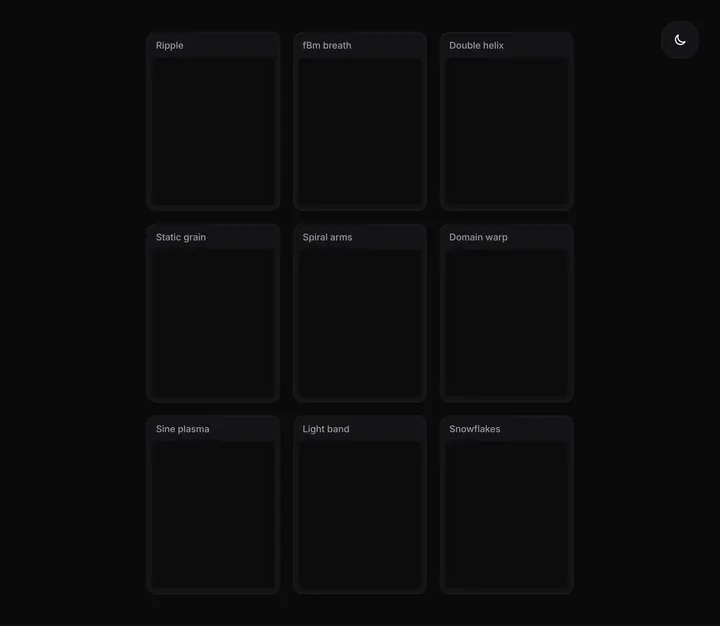
इमेज बनने से पहले फ़्रेम के भीतर डिफ़ॉल्ट 20px की दूरी पर वर्गाकार डॉट-मैट्रिक्स सजाया जाता है, जहाँ हर बिंदु की त्रिज्या और ओपैसिटी उसके केंद्र से फ़ंक्शन द्वारा रियल-टाइम में निकाली जाती है और चारों किनारों पर कोमल विग्नेट से चमक धीमी होती है; डार्क मोड में चमकते बिंदुओं के चारों ओर सौम्य आभा रहती है और फ़्रेम के किनारे पर विपरीत दिशाओं में घूमती भीतर व बाहर की दो ब्रीदिंग प्रकाश-परतें चलती हैं। ये 9 लोडिंग पैटर्न तीन श्रेणियों में बँटे हैं:
- नॉइज़ श्रेणी: fBm breath चार स्तरों के फ़्रैक्टल नॉइज़ को जोड़कर बादलों की तरह धीमा उतार-चढ़ाव बनाता है और बाकी सभी प्रभावों का आधार भी है; Domain warp एक नॉइज़ परत से दूसरी परत को धकेलते हुए एक दिशा में बहाता है, जिससे धुएँ के बहने जैसा रूप बनता है।
- ज्यामितीय श्रेणी: Ripple केंद्र से समकेंद्रित तरंगें फैलाता है, Spiral arms तीन सर्पिल भुजाओं को घुमाता है, Sine plasma चार साइन तरंगों का व्यतिकरण रचता है, Light band हर 3.3 सेकंड में तिरछी कोमल प्रकाश-पट्टी गुज़ारता है, Double helix फ़्रेम के आर-पार घूमती दोहरी कुंडली और दोनों लड़ियों के बीच जोड़ने वाली कड़ियाँ बनाता है, और Snowflakes छह-भुजाओं वाले शाखित हिमकणों को बारीक एकल-बिंदु बर्फ़ के साथ धीरे-धीरे घूमते हुए गिराता है (हर भुजा कम से कम 4 डॉट-दूरी लंबी रहती है, ताकि छोटे फ़्रेम में भी शाखाएँ साफ़ दिखें)। सभी ज्यामितीय पैटर्न में हल्का नॉइज़ मिलाया जाता है ताकि बिंदुओं की चमक में सूक्ष्म अंतर रहे और दृश्य “बन रही है” की जीवंत स्थिति के करीब लगे।
- रैंडम श्रेणी: Static grain हर बिंदु को उसके अपने फ़ेज़ पर यादृच्छिक चमक स्तरों के बीच सहज इंटरपोलेशन से बदलता है (लगभग 2.5 बार प्रति सेकंड), जिससे पुराने टीवी के स्नो स्क्रीन जैसा टेक्सचर मिलता है और कठोर टिमटिमाहट नहीं होती।
प्रकटन: 9 रिवील ट्रांज़िशन
हर लोडिंग पैटर्न के साथ डिफ़ॉल्ट रूप से एक रिवील ट्रांज़िशन जुड़ा है, लेकिन किसी भी पैटर्न को किसी भी रिवील के साथ स्वतंत्र रूप से मिलाया जा सकता है—इनमें Halftone, Dissolve, Denoise और Cells सबसे बहुउपयोगी हैं:
| रिवील | डिफ़ॉल्ट पैटर्न | उभरने का तरीका |
|---|---|---|
| Fisheye (फ़िशआई) | Ripple | केंद्र से वृत्ताकार क्षेत्र फैलता है; भीतर की तस्वीर फ़िशआई उभार के साथ आती है और फैलते हुए समतल हो जाती है |
| Halftone (हाफ़टोन विस्तार) | fBm breath | बिंदु पहले अपने क्षेत्र का औसत रंग पकड़कर फूलते और आपस में जुड़ते हैं, फिर दूसरे आधे हिस्से में धुँधलेपन से तीक्ष्ण फ़ोकस में आते हैं |
| Unzip (खुलती ज़िप) | Double helix | क्षैतिज मध्य रेखा से ऊपर और नीचे लहरदार ढंग से खुलता है; किनारे कुंडली के साथ लहराते हुए अंत में सीधे हो जाते हैं |
| Denoise (नॉइज़ निवारण) | Static grain | गहरे धुँधले चित्र पर प्रति सेकंड 24 बार बदलते गतिशील कण धीरे-धीरे छँटते हैं, मानो रिवर्स डिफ़्यूज़न से शोर साफ़ हो रहा हो |
| Spiral (सर्पिल वाइप) | Spiral arms | एकल सर्पिल भुजा फ़्रेम के केंद्र से घूमते हुए पूरी तस्वीर को खोलती जाती है |
| Dissolve (घुलकर उभरना) | Domain warp | स्मूद नॉइज़ मैप के अनुसार हिस्सा-दर-हिस्सा कोमलता से घुलकर सामने आते हैं और किनारे सहज रहते हैं |
| Interference (व्यतिकरण) | Sine plasma | निरंतर बहते चार साइन व्यतिकरण क्षेत्र को थ्रेशोल्ड मानकर तस्वीर प्रकट होती है |
| Stream (पंक्ति-दर-पंक्ति) | Light band | ऊपर से नीचे पंक्ति-दर-पंक्ति बढ़ता है और अग्रिम किनारे के ऊपर 2px से 16px की क्रमिक रंग-ब्लॉक पट्टी रखता है |
| Cells (कोशिका प्रस्फुटन) | Snowflakes | Voronoi जाल से क्षेत्र बाँटकर पहले आधे हिस्से में अलग-अलग क्षणों पर प्रत्येक केंद्र से गोलाकार रूप में खिलता है |
इनमें Halftone, Denoise और Cells प्रकटन के समय केंद्र से बाहर की ओर एक शॉकवेव भी फैलाते हैं—वलय के बाहर हल्का खिंचाव और भीतर हल्का संकुचन होता है, तथा केवल प्रकट हो चुके चित्र हिस्से पर संयत चार-रंगी कोमल चमक जुड़ती है जो अनखुले डॉट-मैट्रिक्स को कभी प्रकाशित नहीं करती।
हर प्रकटन में साझा बारीकियाँ
- ज़ूम और सॉफ्ट-फ़ोकस स्थिरता: प्रकटन डिफ़ॉल्ट रूप से 1.4 सेकंड चलता है और तेज़ शुरुआत व धीमे ठहराव वाले कर्व का उपयोग करता है। तस्वीर 10% बड़ी और हल्की धुँधली अवस्था में प्रवेश कर धीरे-धीरे मूल आकार और पूर्ण स्पष्टता पर स्थिर होती है (Halftone व Denoise में अपना स्पष्टता संक्रमण होता है, इसलिए उन पर अतिरिक्त ब्लर नहीं लगाया जाता), जबकि फ़्रेम स्वयं स्थिर रहता है।
- किनारे का काँच अपवर्तन: फ़्रेम के भीतरी 26px क्षेत्र में काँच की ढलवाँ किनारी जैसा प्रभाव रहता है जो किनारे की तस्वीर को भीतर से सैंपल कर हल्का खींचता है (बिल्कुल किनारे पर डिफ़ॉल्ट रूप से अधिकतम 12px); प्रकटन की अग्रिम रेखा के भीतर 20px क्षेत्र में भी हल्की लहरदार मुड़न रहती है जो अंत के करीब शांत हो जाती है।
- विरूपण के साथ रंग-बिखराव: केवल जहाँ अपवर्तन से पिक्सेल खिसकते हैं, वहीं लाल और नीले चैनल के सैंपलिंग विस्थापन को क्रमशः 30% बढ़ाया और घटाया जाता है; स्थिर और समतल हिस्सों में रंग कभी अलग नहीं होते, और अग्रिम रेखा पर भी रंगीन आउटलाइन के बजाय केवल महीन सफ़ेद चमक-रेखा रहती है।
- डिकोडिंग और समय-सीमाएँ: इमेज पूरी तरह डिकोड (
image.decode()) हो जाने के बाद ही रिवील ट्रांज़िशन शुरू करें; 017 लोडिंग पैटर्न के सिद्धांत को आगे बढ़ाते हुए 300ms के भीतर लौटने वाली इमेज के लिए डॉट-मैट्रिक्स छोड़कर सीधे फ़ेड-इन करें ताकि झपकन न दिखे; एक साथ कई इमेज बनते समय (जैसे 3×3 ग्रिड) उन्हें अलग-अलग अंतराल पर क्रम से प्रवेश कराएँ; और अनुरोध विफल होने पर बिंदुओं को वहीं रोककर कारण बताएँ तथा रीट्राई का विकल्प दें।
प्रदर्शन और पैरामीटर ट्यूनिंग
हर बिंदु की चमक पहले “प्रति बिंदु एक पिक्सेल” वाले छोटे टेक्सचर में गिनी जाती है, और पूरे आकार का फ़्रेम बनाते समय केवल उसे पढ़ा जाता है—पूरे स्क्रीन के हर पिक्सेल पर नॉइज़ की गणना नहीं होती; स्थिर डिज़ॉल्व मास्क भी आरंभ में आधे आकार पर एक बार बनाकर दोबारा उपयोग किया जाता है। कैनवास केवल इमेज बॉक्स को ढँकता है, पिक्सेल घनत्व 2× तक सीमित रहता है और व्यूपोर्ट से बाहर जाने पर ड्रॉइंग रुक जाती है; तस्वीर पूरी तरह स्थिर होने पर अंतिम फ़्रेम बनाकर लूप बंद हो जाता है, जिससे स्थिर अवस्था में GPU खर्च शून्य रहता है। सिस्टम में Reduced Motion चालू होने पर ब्रीदिंग, ज़ूम, अपवर्तन, रंग-बिखराव और शॉकवेव बंद कर स्थिर डॉट-मैट्रिक्स तथा 200ms फ़ेड-इन का उपयोग करने की सलाह दी जाती है।
ब्रीदिंग गति, प्रकटन अवधि, बिंदु-दूरी, बिंदु आकार, नॉइज़ स्केल, ज़ूम, ब्लर, रंग-बिखराव, किनारे का अपवर्तन और डार्क-मोड चमक—सभी लाइव स्लाइडर के रूप में उपलब्ध हैं। हर पैटर्न अपने डिफ़ॉल्ट मान अलग सहेजता है, जिन्हें किसी पंक्ति पर डबल-क्लिक कर या रीसेट दबाकर बहाल किया जा सकता है।
AI को सौंपें
नीचे दिया Prompt पहले प्रोजेक्ट के मौजूदा इमेज-जनरेशन प्रवाह और रेंडरिंग स्टैक को समझेगा, फिर लागू होने के स्थान, पैटर्न व रिवील संयोजन और सेटिंग्स पैनल की दृश्यता पर एक-एक कर आपकी पुष्टि लेगा; सहमति के बाद प्लेटफ़ॉर्म क्षमता के अनुरूप इसे लागू करेगा और बिना GPU वाले वातावरण के लिए फ़ॉलबैक भी देगा, जबकि उत्पाद का मूल लेआउट, रंग और कॉपी अपरिवर्तित रहेंगे।
Build the wait and the arrival for generated images in my product. While an image is being made, its box shows a grid of dots that breathe in one of nine loading patterns, under a status line with a moving sheen. When the image is ready it comes in through the dots in one of nine reveals, enlarged and soft at first and settling sharp, its edges bending like glass, with a colour split where the picture bends; three of the reveals also send a shockwave across it. Any pattern can be paired with any reveal. A settings panel shows the key numbers as sliders, set to the defaults below, so they can be tuned live.

Every value here comes from a working demo and is a default, not a requirement. Build it with these values first, then let me tune them with the panel (section 9).

Before building, look at my project (section 0) and ask me these, one at a time, with the recommended answer marked:
1. Where it goes: every place a generated image appears (recommended; list them), or the ones I name.
2. Which pattern and reveal: one pair everywhere (recommended: fBm breath with Halftone grow, or let me pick from section 3 and 5), a pair per place, or a different pair for each new image.
3. The settings panel: only in development (recommended), behind a toggle, or for everyone.
Then sum up my answers, say how you will build it on my platform (section 10), and wait for my go-ahead.

0. Start from what exists
- Find how images are generated and shown: where a request starts, where the result arrives (URL, blob, base64 or stream), whether progress or a partial image is reported, and the component that draws the image box.
- Find how the project draws (DOM, canvas, WebGL, a native view tree), its framework and versions, its slider components, its dark mode and its reduced-motion setting.
- Tell me in a few lines what you found before asking.

1. Timing
- The pass: the dots fade in over 500ms; the status line reads "Making the first draft…", then "Refining the details…" after 1.3s, and "Done" once the image is decoded and starts to come in. Use my product's own wording and language if it has some.
- The reveal starts when the image is decoded (await image.decode() or its equivalent), never on the network response alone. It runs 1400ms with cubic-bezier(0.16, 1, 0.3, 1): fast in, a long settle. Call its progress R, 0 to 1, eased.
- If the image is ready within 300ms of the request, skip the dots and just fade it in, or the loading state flashes. If the request fails, stop the dots where they are, say what happened and offer a retry.
- Several images at once (a batch or a grid): each comes in after its own delay, picked unevenly, for example 0, 560, 220, 820, 380, 1040, 120, 700, 300ms across a 3 x 3 grid, so they arrive at uneven moments rather than together or as a sweep.

2. The box and the dots
- The image box has the image's own proportions and rounded corners (14px in a 600 x 772 card, the card 28px, concentric). Above it sits the status line, 20px type, in a dim ink; a 96px window of full ink, soft at both ends, crosses the text every 1.7s. Move the window and a copy of the text inside it in opposite directions as transforms, so the text never repaints.
- Dots on a square grid, pitch 20px, centred in the box. Each dot's value v (0 to 1) comes from its loading pattern (section 3), worked out once per dot, not per pixel. The dot's radius goes from 0.55px to 15% of the pitch with v, its opacity from 0.1 to 1. A vignette dims the dots near the box's edge: 0.45 + 0.55 * smoothstep(8, 72, distance to the edge).
- Dot glow (dark theme only): a soft halo round each lit dot, a Gaussian of sigma 0.3 * pitch, strength v^2, summed over the dot's own cell and its eight neighbours so halos cross cells without a seam.
- Edge glow while loading (dark theme only), in two layers set apart so they never swell together. Outer: a wide haze (exp(-d / 12)) and a thin line on the rim (exp(-d / 2.5)), d the distance in from the box's edge, breathing every 2.4s, with two brighter arcs turning clockwise once in 8s. Inner: a soft band about 6px in (a Gaussian 3.5px wide) plus a faint wide haze, breathing every 3.7s from the opposite point of its swell, with three arcs turning anticlockwise once in 11s. Both fade out over the first third of the reveal.
- Light theme: dark dots on a pale box, no glows, a softer rim on the reveals.

3. The nine loading patterns
All take p, the dot's centre in px, and t, the breathing clock in seconds (scaled by the Breathing slider, so changing speed never jumps). n is value noise in fBm: four octaves, each at twice the frequency and half the amplitude, read at p / scale (scale 180px) and t * 0.32.
- Ripple: rings from the centre, w = 0.5 + 0.5 * sin(r * 5.2 * PI / 2 - 2.6t), r = |p - centre| / scale; v = smoothstep(0.15, 0.85, mix(n, w, 0.6) * (0.55 + 0.6n)).
- fBm breath: v = smoothstep(0.28, 0.74, n). The base the others build on.
- Double helix: two strands lying across the box and turning, y = ±72 * sin(x / 44 - 1.8t) (in units of the box's height / 306), each a Gaussian 10 wide, the nearer one brighter (by cos of the phase), with base pairs on every second column between them.
- Static grain: each dot eases from one random level to the next about 2.5 times a second, on its own offset, mixed 42% over n. Ease between levels (smoothstep), or it blinks.
- Spiral arms: three arms, s = 0.5 + 0.5 * sin(3θ + 5.5r - 2.2t); v = smoothstep(0.12, 0.85, mix(n, s, 0.55) * (0.6 + 0.5n)).
- Domain warp: the noise read at a point pushed far by more noise, the whole drifting one way so it streams like smoke: drift = (0.22t, -0.1t); w = (fbm(q * 1.1 + drift), fbm(q * 1.1 + drift + 5.2)); v = smoothstep(0.34, 0.7, fbm(q + 4(w - 0.5) + 1.6 drift)).
- Sine plasma: four sines summed, sin(2.6x + 0.9t) + sin(3.1y - 1.1t) + sin(2.2(x + y) + 0.7t) + sin(4.4r - 1.5t), x, y in noise cells; v = smoothstep(0.2, 0.8, mix(0.5 + 0.125 * sum, n, 0.35)).
- Light band: a Gaussian band, 0.15 wide, sweeping diagonally across every 3.3s over half-strength noise.
- Snowflakes: six-armed flakes, each arm with a branch at half its length, one to a square of side z = max(0.27 * box height, 11 * pitch), placed at random in it, with an arm 0.37 to 0.5 z long, turning slowly as they fall (18px/s) with a little sway; behind them single-dot snow, one grain to a square of 0.4z, falling twice as fast at 35 to 60% brightness; noise at 12% beneath. Fold the angle into one twelfth of a turn so one arm and its branch, drawn once, make all six. Keep a flake's arm at least four dots long, or it reads as a blob.

4. How every image comes in
These apply to all nine reveals.
- Zoom in: the picture is read about the box's centre at 1 + 0.10 * (1 - R), so it arrives 10% enlarged and settles to its own size. The box itself never scales.
- Blur in: read the picture 3 mip levels softer at the start, easing to sharp: bias = 3 * (1 - R)^0.8. Halftone and Denoise blur on their own; skip it there.
- Edge bend: the box's rounded edge acts like the bevel of a glass slab. In the last 26px, read the picture from further in by bend * 2 * (1 - R)^0.7 * (1 - d / 26)^2 px (bend 6), so it stretches toward the edge; the edge itself stays put. Along a reveal's own front, the 20px just inside it bend the same way, by bend * exp(-(d / 14)^2), with a slow noise wobble of ±67% along the front, fading out as R passes 0.85.
- Dispersion: wherever the picture is read from a moved place, read red from 30% further along the move and blue from 30% less. Colour then splits only where the picture bends, never where it holds still. Do not draw a coloured outline on the edge; the split belongs to the picture.
- A thin white line rides each front (strength 0.55 on dark, 0.22 on light), fading as R passes 0.85.

5. The nine reveals
Each opens the picture over the dots by a mask a; R is the eased progress.
- Fisheye lens: a circle grows from the centre to cover the box (front = 1.3R - 0.1 of the half-diagonal). Inside, the picture bulges like a fisheye (read at centre + d * (1 - k + k * u^2), u = distance / front, k = 0.5(1 - R)), a damped wave runs behind the edge, and red and blue split toward the rim; all of it relaxes to flat.
- Halftone grow: each dot takes the picture's colour averaged over its cell and swells to half the pitch, until the circles touch; then the picture focuses in from 4.5 mip levels soft over the second half.
- Unzip: opens from the middle outward, |y| < R * (half height + 30px) + 22 * sin(x / 44 - 1.8t) * (1 - R) (the wave in the helix's units, box height / 306), so its edges wave with the strands until they settle straight.
- Denoise: the picture from 6 mip levels soft to sharp, (1 - R)^1.4, under 1.5px grain of ±45% * (1 - R)^2 that refreshes 24 times a second: diffusion run backwards.
- Spiral wipe: one arm sweeps out from the centre: key = 0.72 * r / half-diagonal + 0.28 * angle / 2PI; open where key < 1.12R - 0.06.
- Noise dissolve: a smooth two-octave noise map, drawn once at half size; open where it is below 1.3R - 0.15, with a soft edge of ±0.03.
- Interference wipe: the same four-sine sum as Sine plasma as a threshold map, still moving; open where it is below 1.25R - 0.1.
- Top-down stream: rows arrive from the top (front at 1.22R - 0.06 of the height); the band of 16% just above the front is still coarse, in blocks of 2px where it meets the finished rows growing to 16px at the front, the way a streamed image fills in.
- Cell bloom: Voronoi cells about a fifth of the box's height; each starts at a random moment in the first 55% of R and opens as a circle growing from its seed.

Shockwave (on Halftone grow, Denoise and Cell bloom): as the image comes in, a ring runs out from the centre to 1.25 x the half-diagonal, 0.12 x the half-diagonal wide. With x = (distance - ring radius) / width and z = 0.75x, the picture is pushed outward by bend * 1.6 * 2.33 * z * exp(-z^2) * A (it stretches beyond the ring and squeezes behind it), with the same dispersion, and A = smoothstep(0, 0.08, R) * (1 - smoothstep(0.55, 1, R)). A faint glow rides the ring in four colours blending softly, inside to out #508CFF, #A06EFF, #FF6EB4, #FFBE8C, strength A * exp(-0.5x^2) * 0.16 on dark (screen: added light) and 0.12 on light (a tint), only on the part of the image already in, never on the dots.

6. Pairing patterns and reveals
- Each pattern has a reveal it suits: Ripple with Fisheye lens, fBm breath with Halftone grow, Double helix with Unzip, Static grain with Denoise, Spiral arms with Spiral wipe, Domain warp with Noise dissolve, Sine plasma with Interference wipe, Light band with Top-down stream, Snowflakes with Cell bloom. Any pattern still works with any reveal; Halftone, Dissolve, Denoise and Cell bloom are the most general.
- If my product shows a gallery of the options (a picker or a settings page), show the patterns as tabs and the reveals in a row beneath, each wired to its pattern by a faint S-curve. As an image comes in, a bright run draws down its wire from the pattern to the reveal, with a dot at its head, and the reveal's name lights up with it (brightness p^2).

7. Theme
- Dark: page #0b0b0c, card #161618, box #0e0e0f, dots #f2f2f2. Light: page #f7f7f7, card #ffffff, box #f4f4f4, dots #1c1c1c. Use my product's own colours if it has them; keep the dots neutral.
- The theme crossfades over 480ms; the dots, box and glows follow it.

8. Keep it cheap
- Work the pattern out once per dot into a small texture (one texel per dot), then draw the box at full size and only read it back. Never evaluate noise per pixel.
- Masks that never change (the dissolve map) are drawn once at start, at half size.
- Once an image is fully in and not fading, draw it once and stop; such a frame does no GPU work.
- The canvas covers only the image boxes, at no more than 2x pixel density. Nothing draws while the box is off screen.
- Reduced motion: no breathing (a still pattern), no zoom, bend, dispersion or shockwave; the image fades in over 200ms.

9. The settings panel
- One row per number: its name, a slider and its value with the unit. Moving a slider updates the picture at once. Each pattern keeps its own values (the tab on show sets the panel); double-clicking a row puts it back to the pattern's default, and a Reset button, shown only once something has moved, puts the whole pattern back.
- Rows and defaults: Breathing 100% (0–300), Reveal time 1400ms (400–3000), Dot pitch 20px (12–36), Dot size 15% (5–30), Noise scale 180px (80–360), Zoom in 10% (0–30), Blur in 50% (0–100), Dispersion 30% (0–100), Edge bend 6px (0–20), Edge glow 30% (0–100, dark only), Dot glow 40% (0–100, dark only), and the theme (Auto, Dark, Light).
- Per-pattern defaults on top of those: fBm breath reveal 1600, zoom 8, blur 30, bend 8; Domain warp scale 220, breathing 120, reveal 1600, blur 70; Snowflakes pitch 15, dot 14, reveal 1800, dispersion 35, bend 8; Ripple breathing 90, reveal 1600, zoom 6, dispersion 35; Light band breathing 110, reveal 1300, zoom 8, bend 8; Sine plasma scale 200, reveal 1600; Double helix pitch 18, breathing 110, dispersion 25; Static grain pitch 16, dot 13, reveal 1800, zoom 12, blur 30, dispersion 25, bend 8; Spiral arms breathing 120, reveal 1500, dispersion 35.
- Use my slider component if I have one; otherwise a plain range input with a filled track, an upright handle and a number box beside it.

10. How to build it, by platform
These are suggestions; check them against my stack and versions.
- Web (as in the demo): one WebGL 2 canvas over the image boxes. Pass 1 draws the pattern into a texture of one texel per dot; pass 2 draws each box with its viewport set to the box, reading that texture, the picture (with mipmaps, for the blur and the halftone colours) and the masks. One requestAnimationFrame loop for every box on the page. Keep the status line in the DOM.
- iOS: Metal (MTKView) with the same two passes, or SwiftUI on iOS 17+: a colorEffect for the dots and a layerEffect for the reveal, bend and dispersion.
- Android: on API 33+, AGSL RuntimeShader in Compose (graphicsLayer with RenderEffect); otherwise OpenGL ES 3.
- Flutter: FragmentProgram shaders, the dot texture drawn with a CustomPainter. React Native: react-native-skia RuntimeEffect.
- Without a GPU path: draw the dots on a 2D canvas (one arc per dot), and reveal the image with CSS: a mask-image for the shape, transform: scale for the zoom and filter: blur for the softness; leave out the bend, dispersion and shockwave.

11. Check
- Each pattern reads as itself on a small box as well as a large one (the snowflakes as six-armed flakes, the helix as two strands).
- The image starts to come in only once decoded; a fast image skips the dots; a failure stops them and says why.
- On arrival the picture is enlarged and soft and settles sharp; its edges bend and split colour only where they move; the white front line is plain, never coloured.
- The shockwave's glow stays faint and never lights the dots.
- Every slider changes the picture at once; each pattern keeps its own values; Reset restores them.
- 60 fps on a mid-range phone with several boxes loading; no GPU work once the images are in; light and dark, reduced motion and keyboard use of the panel all checked.